Crafting Depth: A Guide to the Cardinal Shadow Box 3D SVG
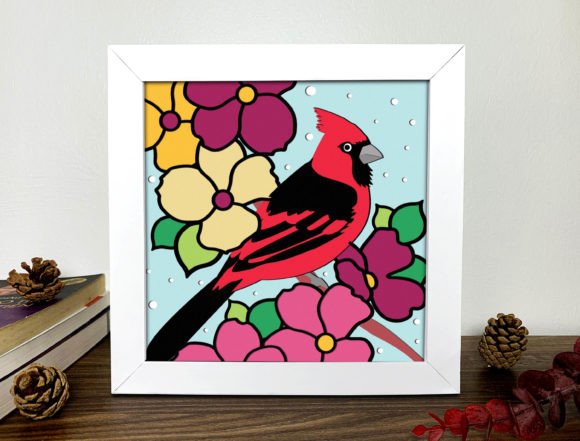
There is a distinct satisfaction in watching a flat sheet of paper transform into a scene with depth, shadow, and life. This is the magic of layered papercutting, and few subjects capture the imagination quite like the vibrant red of a cardinal against a winter backdrop. If you are exploring the world of digital crafting, you have likely encountered listings for a Cardinal Shadow Box 3D Svg or a standard Cardinal Svg. While these files offer incredible potential for home decor, greeting cards, and small business products, the journey from download to finished masterpiece is often where beginners stumble. Understanding the nuances of these digital assets before you start cutting can save you time, material, and frustration.
First, it is essential to clarify exactly what you are purchasing. When you buy a Cardinal Shadow Box 3D Svg, you are acquiring a digital blueprint, not a physical object. No actual product will be sent to your doorstep. Instead, you receive a collection of files—typically including SVG, DXF, PDF, and EPS formats—that serve as instructions for your cutting machine. This distinction is vital for managing expectations. The beauty of this digital format lies in its flexibility; you become the manufacturer. You have the freedom to choose paper of different colors, textures, and weights depending on your specific preferences and the mood you wish to create. Whether you envision a classic red cardinal on white snow or a modern monochromatic look, the creative control is entirely yours.
Navigating File Compatibility and Machine Settings
One of the most common misunderstandings among new crafters involves file compatibility. You might see a file labeled as compatible with "all cutters on the market" and assume it will work perfectly without any adjustment. While it is true that formats like SVG and DXF are industry standards supported by machines such as the Cricut Maker 3, Silhouette Cameo, and Brother ScanNCut, the way these machines interpret data can vary. A frequent mistake is importing the file and immediately hitting "cut" without checking the layer structure.
A high-quality Cardinal Shadow Box 3D Svg, such as one designed with 17 intricate layers, requires precise organization. If the layers are not correctly grouped or if the weld/unite functions were not applied properly by the designer (or if they get scrambled during import), your machine might attempt to cut thousands of tiny, unnecessary paths. This leads to "weeding" nightmares where you spend hours removing tiny bits of paper instead of assembling your art. To avoid this, always open your file in your design software first. Check that the 17 layers are distinct and that there are no stray points or overlapping lines that could cause the blade to drag or tear the paper.
The Critical Role of Paper Selection
Perhaps the most impactful variable in your project's success is the material you choose. Since the buyer provides the paper, the quality of the final Cardinal Svg projection depends heavily on this choice. A significant error many enthusiasts make is using paper that is too thin or too thick for the complexity of the design. For a 17-layer shadow box, the cumulative thickness of the stacked paper can be substantial. If you use heavy cardstock for every single layer, the final assembly might become too bulky to fit into a standard shadow box frame, or the edges may look uneven and jagged.
Conversely, using paper that is too light can result in a flimsy structure that lacks the rigidity needed to hold the 3D shape. The adhesive tabs, which are crucial for spacing the layers, may tear under the weight if the paper grade is insufficient. A better approach is to test a single layer first. Many experienced crafters recommend using a mid-weight cardstock (around 65-80 lb) for the main visual layers and a slightly heavier stock for the base or backing if extra stability is needed. Furthermore, consider the color core of your paper. If you are cutting intricate details like the feathers of a cardinal, white-core cardstock is preferable. If the paper has a colored core, any slight imperfection in the cut or fold will reveal a distracting line of a different color, breaking the illusion of the 3D effect.
Assembly Precision and Dimensional Accuracy
Once the cutting is complete, the assembly phase begins. This is where the theoretical design meets physical reality. A common oversight is ignoring the dimensions provided in the product description. A file designed for a 20x20cm (7.8x7.8in) canvas is optimized for that specific scale. Some users attempt to resize the Cardinal Shadow Box 3D Svg significantly larger or smaller to fit a different frame. While digital files are scalable, resizing them disproportionately can distort the delicate connections between layers. More importantly, resizing smaller can make the weeding process nearly impossible, as the tiny bridges holding the bird's beak or branch details together may vanish.
To ensure the best results, stick close to the recommended dimensions. If you must resize, do so uniformly and check the smallest details on your screen before cutting. Another practical tip involves the spacing spacers. In a 17-layer design, the depth perception relies on consistent spacing between each sheet. Beginners often glue layers directly together or use inconsistent amounts of foam tape. This flattens the image and ruins the 3D effect. Instead, use pre-cut foam squares of uniform thickness for every layer. Build your project from the background forward, ensuring each layer is perfectly aligned with the one beneath it. Patience here pays off; rushing the gluing process can lead to crooked layers that cast awkward shadows, detracting from the cardinal's vivid presence.
Maximizing Value for Creators and Hobbyists
For those looking to turn this hobby into a small business or a content creation venture, the Cardinal Svg offers excellent versatility. However, remember that the license usually dictates how you can use the finished product. Most designers allow you to sell the physical items you create, but reselling the digital file itself is strictly prohibited. Before listing your handmade shadow boxes on marketplaces, review the terms of use included with your download. This protects you from copyright issues and respects the intellectual property of the creator who spent hours designing those 17 layers.
Additionally, do not hesitate to experiment. The prompt encourages buyers to create products and share them with everyone. This community aspect is invaluable. If you try a unique color combination, such as a gold cardinal on a navy background, document the process. Sharing your results not only inspires others but also helps you refine your technique through feedback. Whether you are an educator teaching paper engineering, a marketer creating eye-catching displays, or a homeowner adding a touch of nature to your living room, the key is preparation.
In conclusion, working with a Cardinal Shadow Box 3D Svg is a rewarding experience that blends technology with traditional craftsmanship. By paying attention to file integrity, selecting the appropriate paper weight, respecting the original dimensions, and taking care during assembly, you can avoid the common pitfalls that plague many projects. The result is a stunning, dimensional piece of art that showcases the beauty of the cardinal in a way that flat printing simply cannot achieve. Happy crafting, and enjoy the process of bringing your digital files to life.